This article provides a guide on how to correctly set up Fyffes add‑on v1.0 audits within CertifierOS.
1. GGN o CoC number registration.
Make sure that the producer has a GGN or CoC number in the CertifierOS.
2. Registration of the Site.
For this, choose:
Type = "Sites/PHU and Category = 'Site" for Option 1 producers/Option 1 producers without QMS; or
Type = "Sites/PHU and Category = 'PG/multisite scope information (Site)" for Option 1 producers with QMS and Option 2 producers
3. Registration of the PHU/ Ext PHU.
For this, choose:
Type = "Sites/PHU" and Category = "PHU/Ext PHU" for Option 1/Option 1 producers without QMS producers; or
Type = "Sites/PHU" and Category = "Central PHU" for Option 1 producers with QMS and Option 2 producers
4. Registration of Scope (Products) based on the Site creation performed in step 2.
For this, choose: Type = "Product" and
Select the "Product type" based on the scope
Select the Site name as "Parent", as registered in step 2
5. Registration of the PHU/EXT PHU products based on the PHU/ Ext PHU creation performed in step 3.
For this, choose: Type "Product" and
Select the "Product type" based on the scope
Select PHU/ Ext PHU name as "Parent", as registered in step 3
6. Create an audit report
Fyffes add-on v1.0 reports should be connected to the Audit product category "Fruit and Vegetables", limited to Bananas, Pineapple, and Melons
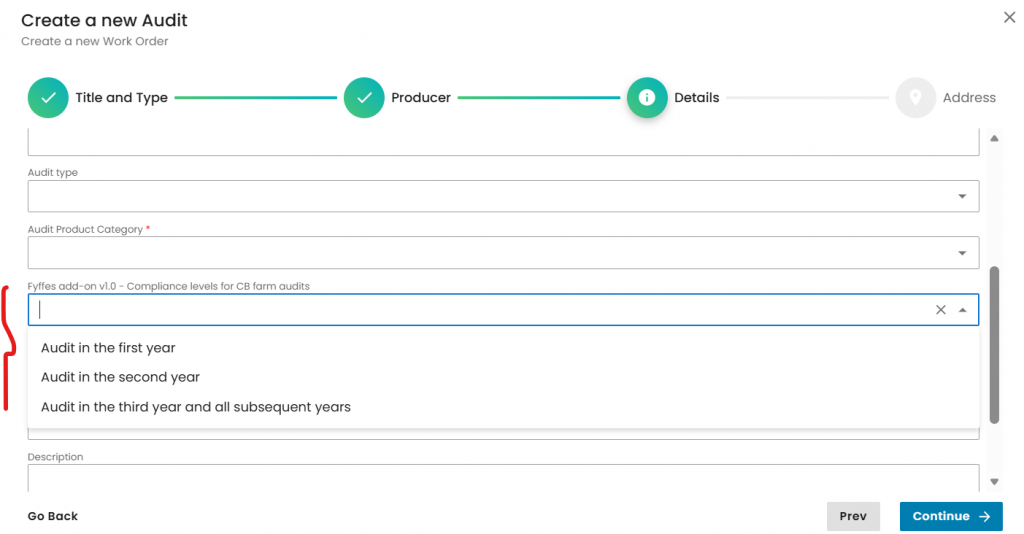
For the particular case of the CB farm audits (Option 1 producers/Option 1 producers without QMS), the system requires selecting the audit year before starting. For the rest options (CB QMS audits), this selection is not required. Please, kindly refer to the screenshot.
3. Once the audit is created, auditors should include in the Scope section any product from steps 4.1 and 5.1
4. Auditors should answer the form and close the audit