
1. The user shall first be added into CB-AT
2. Once the status is “Approved” or "Submitted to GLOBALG.A.P” the SM shall create in COS the user using the same e-mail address as in CB-AT.
Data such as roles (SM, CB Assist /Audit Scheduler, Auditor (Farm or QMS), Reviewer /CB Committee, Signatory) are not synched as of now however rights/user qualification will be synched regular every 30 minutes to COS!
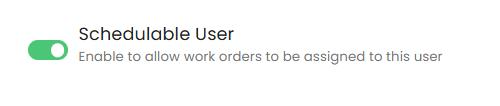
Please also do not forgot to enable this to allow work orders to be assigned to the respective user:
Due to some technical issue, CertifierOS users must have only one role assigned at any time.
If a user is assigned multiple roles, they will be unable to operate within COS.
If a user needs to perform a task that their current role does not permit, the CB Scheme Manager must update the user’s role.
Example:
A user with the Auditor role who needs to act as a Reviewer must have their role changed to Reviewer.
To resume audit activities later, the role must be switched back to Auditor.
In CB-AT different email addresses are used to log in to different CB profiles. Meaning the way COS is set up and synched with CBAT (as mentioned earlier using the e-mail address) the auditor needs multiple accounts depending on how many CBs he/she is working with.
E.g. Auditor1- for CB1 only doing IFA v6 Plants Smart audits and for CB 2 he does IFA V6 Plants Smart and BioDiversity add-on audits.
In conclusion, the auditors currently shall use different e-mail addresses for different CBs.