Certificates created in the Legacy GG Database are migrated to CertifierOS and appear on the “Certificates” page. They can be identified by the double “Certificate ID.”
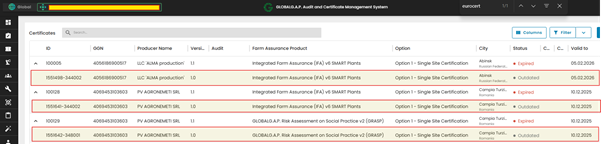
Note: In the example above, all migrated certificates are marked as “Expired.” Once the “Valid to” date is reached, the system updates the certificate status to “Expired,” changes the version from 1.0 to 1.1, and assigns a new Certificate ID in the standard CertifierOS format.
VERY IMPORTANT NOTICE!!!
In CertifierOS, the first certificate is created from the initial audit. This starts the certification chain. The system always connects each audit to its certificate, and the Certification Body must continue using this chain.
Certification in CertifierOS starts with the audit and ends with the certificate or letter of conformance (LoC). Any later modification or recertification must begin with the previous certificate by starting the procedure.
Please note that the same producer cannot get certified against the same Farm Assurance Product (FAP) and reporting option by creating a separate audit outside the existing certification chain. This is because each certificate or LoC is connected to its audit. In case the CB creates a new certification chain, the system will display the following error message: "Duplicate detected, Certificate could not be saved."
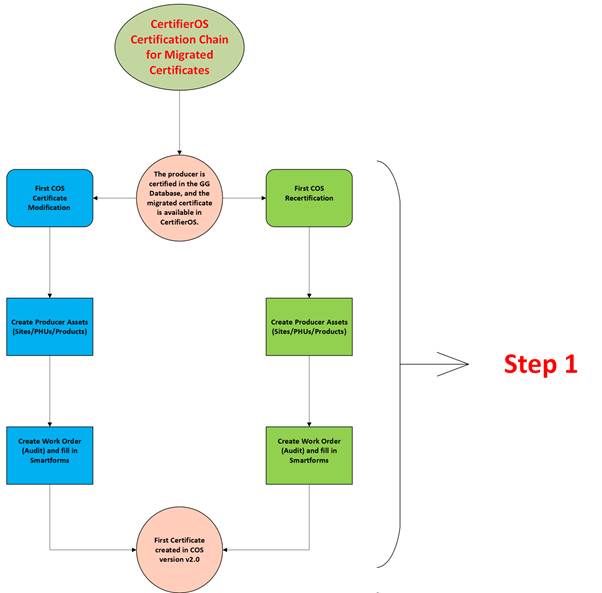
How to Create a Certification Chain for Migrated Certificates:
Step 1:
Important:
The only change a CB can make directly to migrated certificates, without starting a full certification process, is a Certificate Extension.
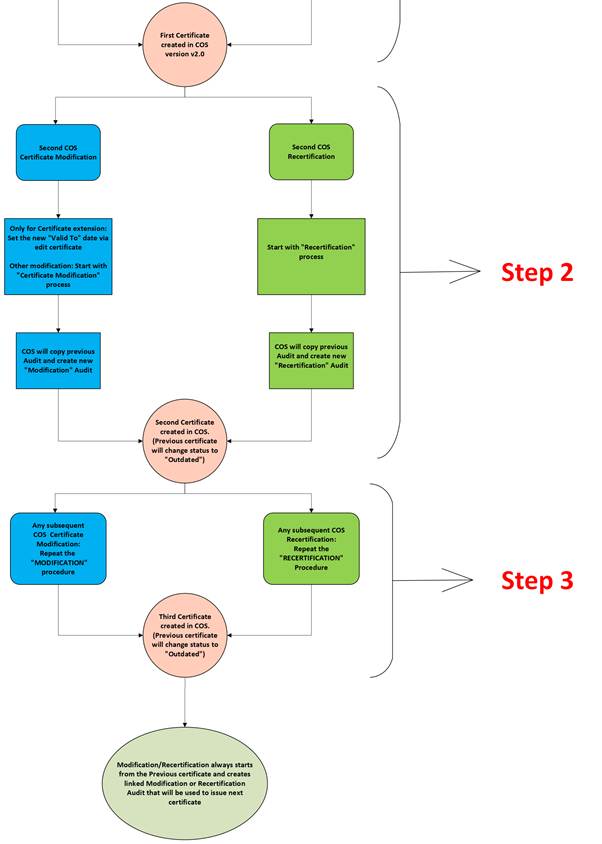
Step 2 and Step 3
Steps 2 and 3 apply to all future certificate modifications and recertifications.
The process begins with the latest certificate issued in CertifierOS under Step 1.
The system creates a full copy of the audit used to issue the previous certificate.
The system creates a full copy of the audit used to issue the previous certificate.
Note: The certification chain does not end after these three steps. Any subsequent recertification or modification follows the same process as Step 2 and creates a new certificate version. Modified certificates are versioned as v1.1, v1.2, v1.3, etc., while recertifications use versions such as v2, v3, and so on.